
AI Software Documentation Automation
Documentation that writes itself and stays in sync with the code
01. THE NEED
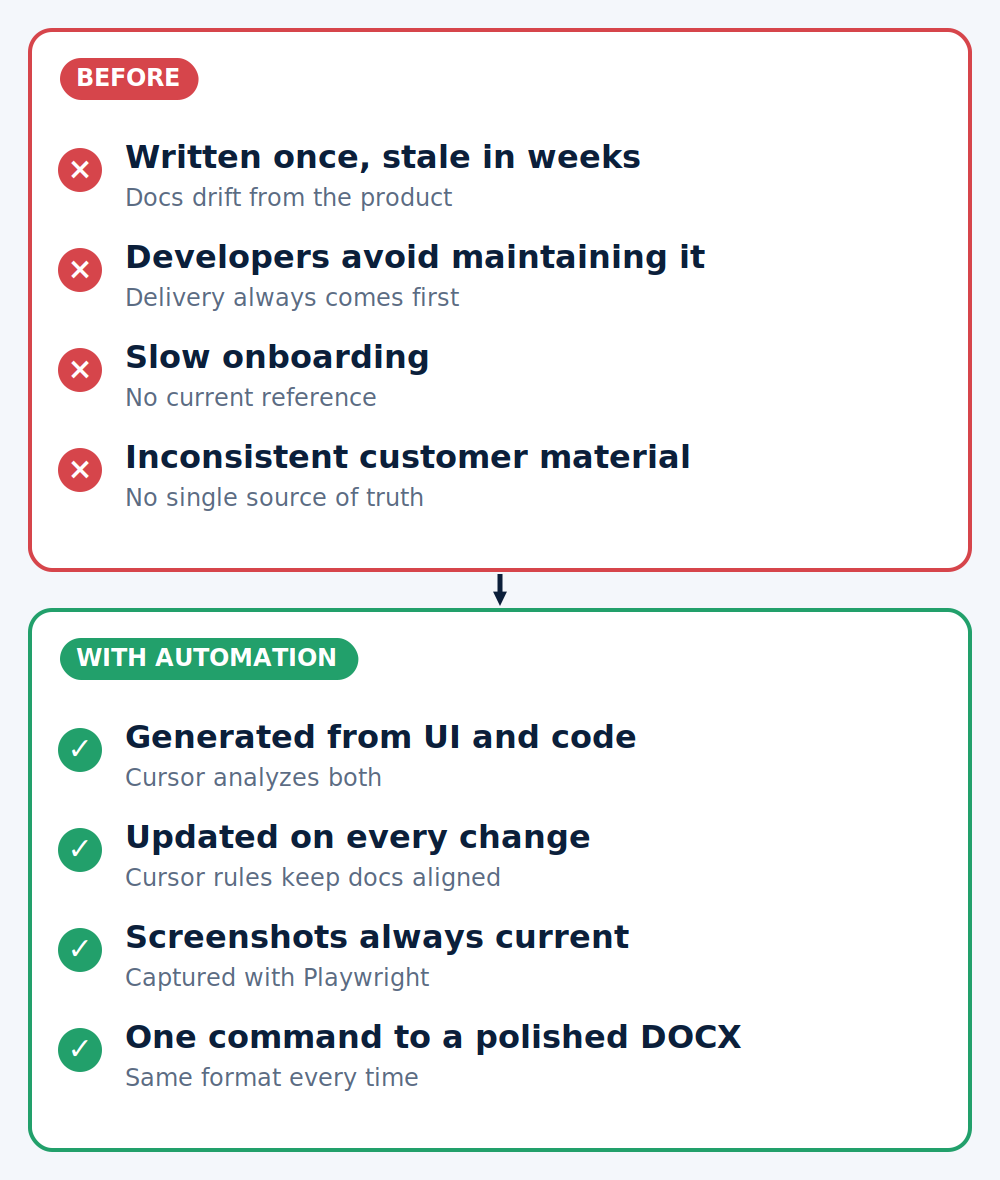
Software documentation is one of the most consistently underserved aspects of production development. Our client faced a challenge familiar to most engineering teams: documentation was either incomplete from the start, or became outdated within weeks of being written. Developers, understandably focused on delivery, were reluctant to invest significant time in writing and maintaining documentation alongside active development cycles.
The consequences were practical and recurring — onboarding new team members took longer, knowledge transfer to customers was inconsistent, and there was no reliable single source of truth reflecting the current state of the product.
Our client needed a solution that could generate thorough, accurate documentation with minimal developer overhead, and keep it synchronized with the codebase as the product evolved.
#AI (Artificial Intelligence)
#AI-Assisted Development
#NLP (Natural Language Processing)
02. THE SOFTWARE
We designed and built an AI-powered documentation system deeply integrated into our client’s existing development workflow. The solution is built on top of Cursor, the AI-assisted IDE already in use by their development team, minimizing friction and avoiding the need to introduce entirely new tooling.
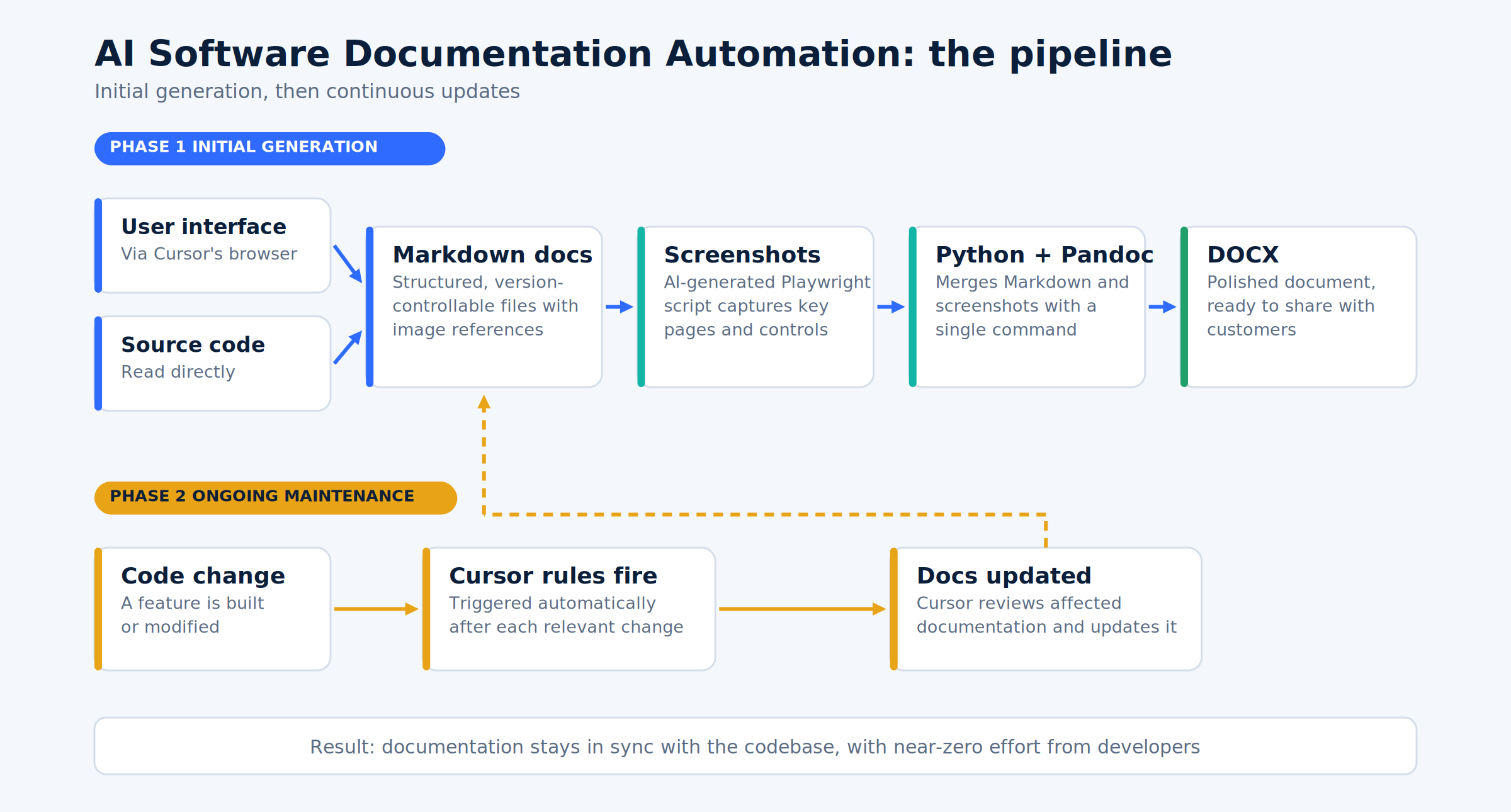
The system operates in two phases:
Initial Generation — Cursor analyzes the project from two angles: the user interface, via its built-in browser, and the source code directly. From this dual-perspective analysis, it iteratively constructs documentation that accurately reflects the current state of the product. The output is a set of Markdown files with references to external images.
To enrich the documentation visually, we use AI to generate a Playwright script that automatically captures screenshots of the key pages, screens, and UI controls referenced in the documentation. These screenshots are saved to disk and indexed to match the references in the Markdown files.
A Python script built on Pandoc then combines the Markdown content and screenshots to produce a polished DOCX file — ready to be shared directly with customers.
Ongoing Maintenance — We defined a set of Cursor rules that automatically trigger documentation updates whenever a new feature is built or an existing one is modified. After each relevant code change, Cursor reviews the affected documentation and updates it accordingly, keeping it aligned with the current state of the project at all times.
03. SOLVED PROBLEMS
- Documentation drift — The most critical problem addressed. Previously, documentation became stale almost immediately after being written. The system now ensures documentation stays synchronized with the codebase after every meaningful change.
- Developer resistance — By automating the generation and update process within tools developers already use, the burden on individual developers is reduced to near zero. Documentation is no longer a manual, time-consuming obligation.
- Inconsistent customer deliverables — The DOCX export pipeline produces a consistently formatted, professional document at any point in time, eliminating the inconsistency of manually assembled customer-facing materials.
- Lack of visual context — Automatically captured screenshots ensure the documentation is not just textually accurate, but visually representative of the actual product, reducing ambiguity for both internal teams and customers.
- Non-repeatable process — The end-to-end pipeline is fully automated and repeatable. Generating documentation for a new project, or regenerating it after changes, requires running a single script rather than starting from scratch each time.



04. KEY FEATURES
- Dual-perspective project analysis — Cursor examines both the UI and source code to build a complete picture of the product before generating documentation.
- Automated screenshot capture — A Playwright script, generated by AI, captures up-to-date screenshots of all relevant screens and controls referenced in the documentation.
- Markdown-first architecture — Documentation is stored as structured, version-controllable Markdown files, making it easy to review, diff, and manage alongside the codebase.
- One-command DOCX export — A Python/Pandoc pipeline converts Markdown and screenshots into a professionally formatted Word document on demand.
- Cursor rules for continuous updates — Custom rules trigger documentation reviews and updates automatically after each relevant code change, with no manual intervention required.
- Seamless workflow integration — The entire system runs within Cursor, the team’s existing IDE, requiring no context switching or new tooling adoption.
05. TECHNOLOGIES

Python
Playwright
06. BEFORE AND AFTER
| Before | With the automated pipeline | |
|---|---|---|
| Documentation state | Incomplete or outdated | Synchronized with the code |
| Developer effort | Manual and time-consuming | Automated inside Cursor |
| Customer deliverable | Assembled by hand | One-command DOCX export |
| Screenshots | Missing or stale | Captured automatically |
07. RESULTS
- Much faster documentation — A full documentation set is produced in a fraction of the time manual writing used to take.
- Always current — Updates ship together with the feature instead of lagging behind it.
- Consistent customer deliverables — Every export has the same professional format and up-to-date screenshots.
- Faster onboarding — New team members and customers work from one reliable source of truth.
08. WHAT’S NEXT
Next: extending the pipeline to more projects and additional export formats.
Have a project in mind?
Get in touch with us for your software development needs!